
Articles
Why Row-Level Security in Tableau Matters (Part 2)

In Part 1 of this series, we explored why Row-Level Security exists in the first place, and how a single missing rule can turn a harmless dashboard click into a compliance nightmare. In this installment, we get practical, looking at the most common way teams implement Row-Level Security directly in Tableau, why it’s appealing, where it can work, and where the cracks eventually start to show.

The DIY Method
So you’ve decided to take data security into your own hands. You’re building Row-Level Security right inside Tableau. Good for you.
This approach is the Swiss Army knife of RLS. Compact. Versatile. Surprisingly effective. Just don’t expect it to fell a redwood tree with it.
Let’s be honest up front: implementing row-level security directly in the database is usually the gold standard. It’s cleaner, more scalable, and makes data engineers everywhere sleep better at night. If you have the time, access, and organizational alignment to do it that way, great. You probably should.
By joining your data to an entitlements table and using Tableau’s built-in user functions, you can enforce row-level access without touching the underlying database. For many teams, this is the difference between “we’ll get to it someday” and “we have a secure solution live this week.”
Think of it as the duct tape of data security. You wouldn’t build a skyscraper with it, but when you need to fix something right now, duct tape gets the job done.
And in the real world, sometimes working with what you’ve got beats waiting for the perfect solution that never ships.
How the DIY Method Works
At its core, in-Tableau RLS is refreshingly simple.
You create an entitlement table, a plainspoken “who-gets-what” list that maps users to the slices of data they’re allowed to see.
For example:
User
[email protected] → East
[email protected] → West
[email protected] → South
That table gets joined to your base data inside Tableau (in this case the join would happen on Region). Then you apply a filter using Tableau’s USERNAME() function.
When Bob from Accounting logs in, Tableau checks his username and thinks, “Cool, Bob gets East.” Everything else quietly disappears. Sue sees West. Keith sees South. Balance in The Force is restored.
No add-ons. No warehouse sorcery. No frantic Slack messages asking IT for a “tiny favor.”
Why This Method Is So Popular
Because, sometimes, you don’t have the luxury of doing it “the right way.”
Deadlines are tight. The database team is booked for the next three quarters. The report owner doesn’t have permissions, SQL chops, or the political capital to change upstream security. And yet, the dashboards still need to go out, securely.
This is where a Tableau-based row-level security approach using an entitlements table and functions like USERNAME() can be a lifesaver.
Is it the most elegant, long-term solution? No. Will some data professionals scoff at it? Almost certainly. But it works, it’s fast to implement, and it puts control back in the hands of the people actually responsible for delivering the reports.
In-Tableau RLS has earned its place for a reason.
It’s fast to implement. You can go from “Uh oh” to “Problem solved” in an afternoon.
It doesn’t require extra licensing. What you have is what you use.
And it’s perfect for small, well-understood deployments where the number of users, regions, or roles fits comfortably in your head.
For many teams, this is the first moment where dashboards stop feeling dangerous and start feeling trustworthy.
Where the Cracks Start to Show
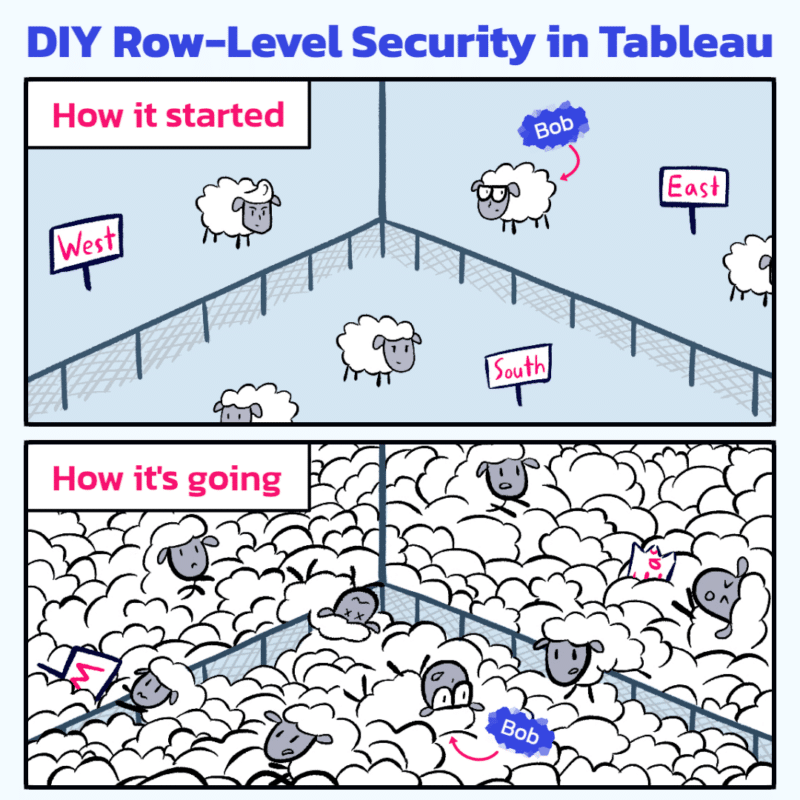
The trouble with DIY reveals itself quietly.
Every user runs a slightly different query. Tableau can’t cache results very effectively because each person’s view is unique.
As data grows, performance slows. As users multiply, the entitlement table becomes a living document that demands constant care and feeding.
And one day, usually late in the week, you’ll find yourself debugging entitlement joins at 10 p.m., wondering how Bob ended up in the South again.
Nothing is broken, exactly. It just takes more effort to keep everything upright.
This is the tax you pay for flexibility.
A Useful Rule of Thumb
Here’s a pro tip worth a post-it on your monitor:
If you can still list all your users in a group chat, this method is fine.
Once you can’t, start planning your upgrade.
That moment doesn’t mean you failed. It means your analytics practice is growing.
The Honest Take
In-Tableau RLS is like eating ramen noodles. Cheap, quick, and oddly satisfying. It can absolutely get you through a long stretch.
Just don’t build your entire diet (data or otherwise) around it.
When your user base expands or your data starts edging into enterprise territory, the limits become harder to ignore. That’s when centralized or database-level security starts looking less like overhead and more like relief.
Coming in Part 3
We’ll talk about what happens when your data operation grows up: centralized governance, Tableau’s grown-up tooling, and what it really means to let the database do the heavy lifting.
Spoiler: it’s not just about scale. It’s about sleeping better at night.
And yes, Bob still manages to show up.