
Artificial Intelligence
The Rise of the Agentic Analyst

Since AI arrived, business intelligence practitioners have been asking what the future of analytics looks like. Predictions range from agents performing all work autonomously to AI changing little about what we do as an industry.
Here’s my position: we’re at the start of a new “Agentic Analyst” model. This agentic analyst will fundamentally change how we choose platforms and tools, and they will be defined by one skill: steering coding agents through analytical work. This requires more technical acumen than the products that have historically dominated BI.
My prediction follows from real gains in model capability, tooling, code generation, and composable platforms. The shift touches all of tech and spares no one. And if you own an analytics budget, it changes what you should be buying, not just how your team works. The immediate task is to define an approach that gets the most out of AI agents and the people who can drive them.
What Is an Agent?
Most people interact with AI through chat applications, often limited to a few IT-approved vendors. They ask a question. The model answers. The interaction ends. That’s useful, but it isn’t fundamentally different from using a search engine, a calculator, or any other tool. That was especially true of early enterprise AI, a pattern known as “copilot.”
Now AI applications have improved. When given tools and skills to utilize software products like Google Drive, Calendly, and Excel, agents can handle more complicated work. AI has become more autonomous, or “agentic.” Now it can act on its environment, run longer tasks, and decide for itself what to do next. This kind of system is known as a “ReAct” agent, short for “Reasoning and Acting.” The model can reason through a complex task and act on its environment to reach a goal.
This is an agent. An agent doesn’t just answer questions; it can take action. It can gather information, make decisions, execute tasks, evaluate results, and keep working toward an objective. But within this category sits a wide spectrum of capability and autonomy.
How you build an agent and where it runs determines what you can do with it.
Architecture matters as much for AI agents as for any other software. The industry is now consolidating around one type of architecture.
RAG Is Dead
Remember when 2024-2025 was “peak RAG” (Retrieval-Augmented Generation)? I was there. For a while, a RAG pipeline felt like the first step in operationalizing AI. You built a knowledge base so agents could retrieve the context that made them useful. Training data alone couldn’t teach a model how your business works (it still can’t), so you gave the AI a way to semantically retrieve unstructured text, PDFs, HTML, Markdown, using embedding models and similarity algorithms. This put the “engineering” in context engineering.
Then something shifted. Researchers noticed that agents perform better with access to a local file system, where they could read text directly (ideally Markdown, not PDF). The implication was clear: if an agent has a file system, you don’t need much engineering to give it context. Pundits declared “RAG is dead,” to the grief of many (including me), who’d spent real time building a pipeline of their own.
RAG isn’t dead, and it has its use cases. But it’s no longer required to build an effective agent, which is why it no longer holds center stage.
Peak MCP
In 2026, I’ll make a bold claim: we are now in “peak MCP” (Model Context Protocol). You may disagree. You may have just committed tons of time and budget to a team that deploys and maintains a fleet of MCP servers. I spent a lot of time there too. And, just like RAG before it, I learned a bitter lesson.
MCP is mainly a tool server. Earlier we saw how tools turn chatbots into agents that act on their environment; MCP serves those tools to agents so business users can reach them inside apps like Codex or Claude Cowork. In the past, developers bundled agents with their tools, one and the same. With MCP, users “bring their own agent” and plug in tools as they wish.
Decoupling unlocks real value, and the enterprise has swooned at the idea of arming executives with flashy new agent tools. Spin up a tool server, make the new Anthropic contract shine, and it sits squarely in the comfort zone of IT, not much different from a CRUD app. What could go wrong?
Plenty. Users started adding two, three, five or more MCP servers to a single agent, each carrying a dozen or so tools, and every tool injecting a description into the context window to remind the model it exists. That reminder is the only way to get reliable tool use. It also means those descriptions sit there at all times, burning tokens and pulling focus off the task.
Bloating a context window is easy, and it makes the agent both less effective and more expensive.
Tools are also static: some developer who you’ve never met defines each tool, once, and it has to fit every use case into the future that they couldn’t foresee.
I built a bundled agent of my own, reachable through a chat app and an API, and hit a performance ceiling fast. I could give a great five-minute demo. A ten-minute task was in the danger zone. Surely that would never fly in the enterprise. I was wrong.
Give decision-makers an MCP and they love it, because they only try it for five minutes and never see the performance iceberg lurking below.
Users love combining Claude with their favorite apps; developers love that no one knows who to call when an agent fails.
MCP isn’t all bad, but it also isn’t perfect. It took off the way RAG did. Does that make it the right abstraction going forward? Perhaps there’s a better way.
Code as Action
AI researchers do what researchers do. They research. They push on models in ways that look strange to the rest of us. They don’t care about budgets, promises, or fiscal calendars. They don’t care that you prefer one chat app, or that you signed a three-year contract in February. But they strike gold often enough.
Just as the file-system finding killed the need for a fancy RAG pipeline, research shows that agents don’t need many tools. In fact, they mostly need just one tool. A super tool, built by the founders of information technology, people who cared so much about liberty they published manifestos alongside their code. Their inventions shaped the operating systems we all run on. This one tool hands an agent the keys to the kingdom.
Turns out the Bash tool is all you need.
That’s right, Bash. Do you know it?
So what is the Bash tool? It’s your terminal, used by an agent, the place where people type arcane commands to make computers do things. Agents aren’t just good at it; they write better Bash in seconds than most shell scripts I’ve seen from humans. Hollywood taught you the terminal belongs to hackers and “script kiddies.” In fact, it’s how people drove computers for decades before GUIs and mouse clicks took over, and because it was built around text for memory efficiency, it’s a near-perfect fit for agents.
Give a model terminal access and it becomes a coder.
Not only can it write code; it can run it. AI now has access to the GNU Coreutils, the essential toolkit every operating system needs: ls to list a directory, cp to copy files, rm to remove them, cat to read them, and dozens more. GNU Coreutils has 108 utilities, which means the single bash tool is really 100-plus tools in one, each represented in the model’s training data far more thoroughly than anything you could build today.
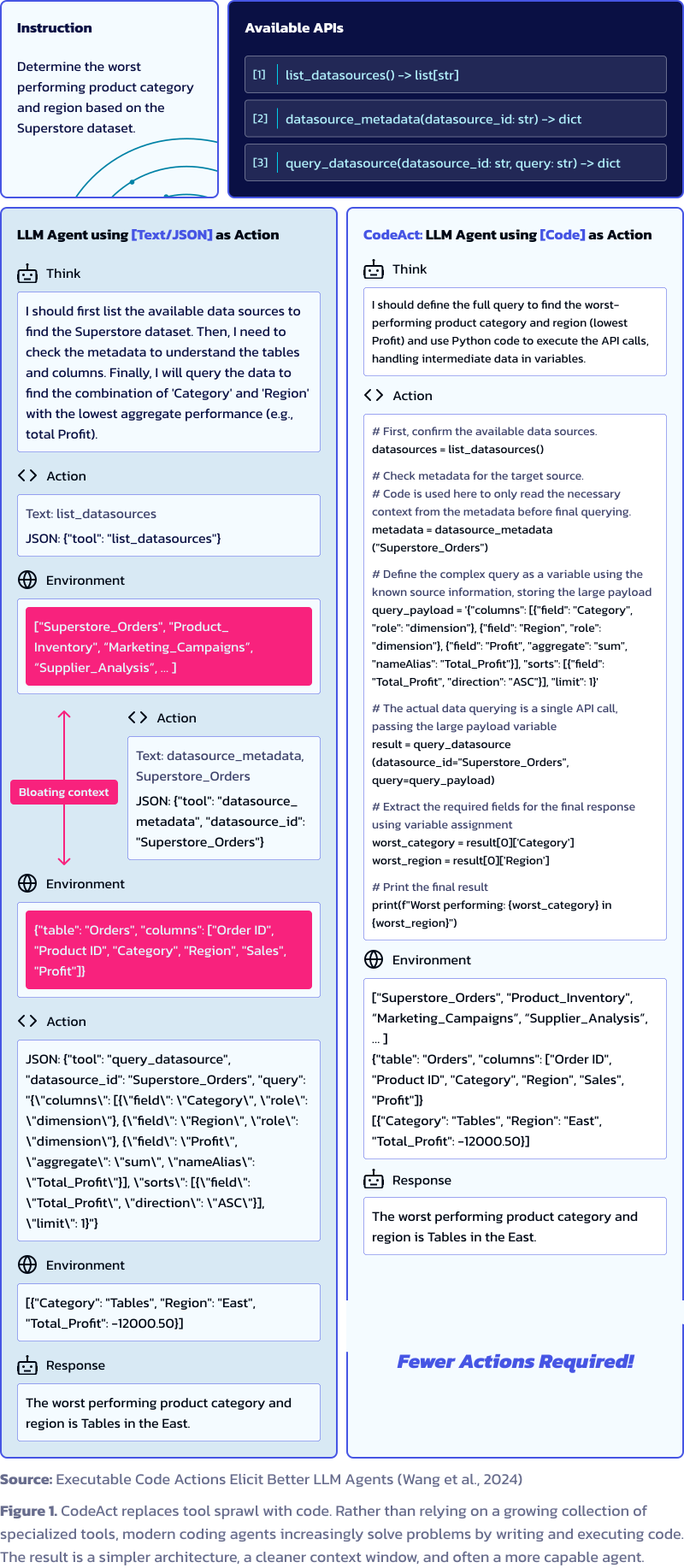
The ReAct of yesteryear is giving way to the CodeAct of today: an agent centered not on static tools bent to fit your workflow, but on solving problems with code, which can be shaped to fit any problem. To be fair, most coding agents today don’t rely on bash alone; many also carry individual read and write tools for files. But that’s the core of a new pattern, CodeAct, where a crowd of tools gives way to a powerful few.
Harnesses like Claude Code, OpenCode, and Codex started as coding tools and now handle design, writing, and data analysis. The philosophy reaches its peak in the Pi agent harness from Mario Zechner, known for its use in OpenClaw. It’s a “minimal” harness with no native MCP support. After a lot of experimentation, Mario found that with a clean context window, a bash tool, and the right prompts, you can do almost anything with a coding agent.
The upshot:
You no longer need a tool server, because you don’t need many tools.
The most effective agents we have, coding agents, don’t need MCP to do their job.
Is MCP dead? Not unless you’re farming clicks on X. But it’s no longer necessary, and so, like RAG, it no longer holds center stage.
The trend is strong enough that Microsoft did the unthinkable: in 2026 it announced native Coreutils support in Windows. Developers moving between Windows, Linux, and macOS had asked for that unified experience for years, settling for heavy workarounds like Windows Subsystem for Linux (WSL). They never got it, until agents wanted it. Agents are so much better with UNIX utilities than with Windows Command Prompt that they pushed Microsoft to adopt Coreutils, not for people, for agents. There’s no stronger signal than that.
Enter the Agentic Analytics
What is agentic analytics? You analyze data with agents. What agents? The best ones available, which today means coding agents that live in your terminal.
But that’s not the whole story, because not all users of the terminal are equal. I’m not talking about the agent. I’m talking about its partner: the human being expected to make the important decisions and review the work of a junior coding assistant that sits in the 99th percentile for Bash and has no idea how the business runs.
Some people have spent an enormous amount of time in the shell. While you enjoyed your weekend, they were “locked in,” writing Bash to deploy an app or move files around. They’re the reason your agent is so good at the terminal. They generated the usage data, built the open-source tools your coding agents lean on, and answered questions on Stack Overflow.
There’s interesting research on why agents reach for one tool over another, and the answer is mostly training data, which is a losing fight for anything going up against UNIX.
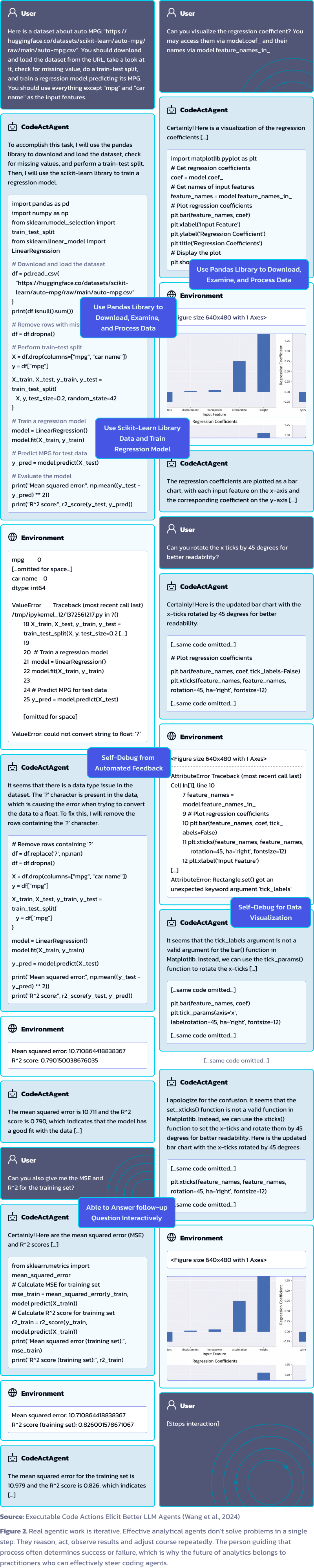
The love of computers that once worried your family and friends is now a superpower. People comfortable in the terminal are comfortable with coding agents like Claude Code, and they’re usually far better at steering one than someone who’s never done this kind of work.
They set agents up for success. They evaluate the output better. They coordinate several agents at once to push throughput.
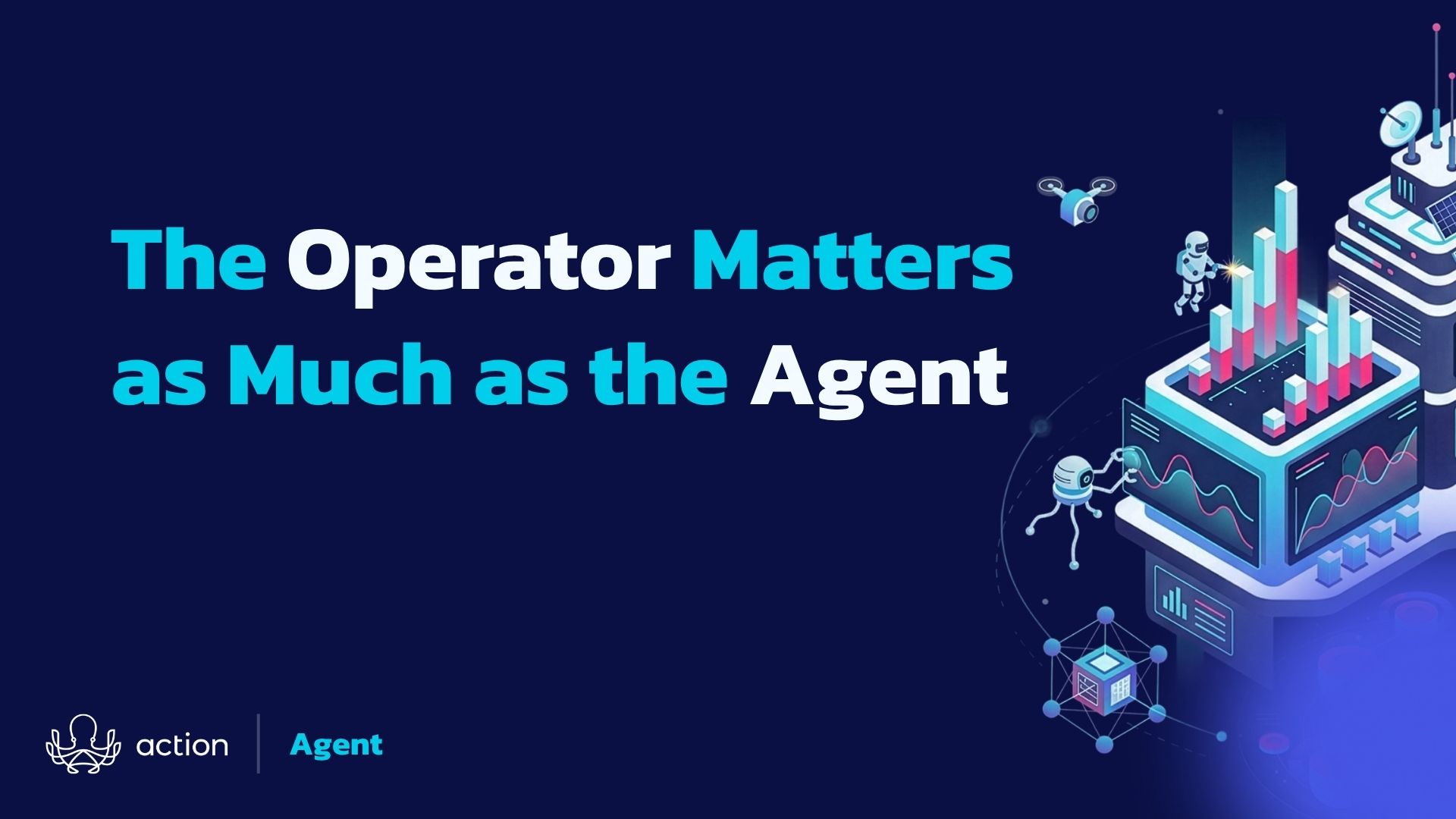
The operator matters as much as the tool.
In analytics, where most of the workflow already maps cleanly onto a coding project, the person steering the agent is the variable that decides the outcome.
So what does this mean for you? Use the terminal more often, and avoid apps that keep you from getting the practice.
You should also hire people with real experience in the shell. Find experts who understand these shifts and can help you prepare. Find analytics architects who can choose the agent infrastructure you need now, not next year when everyone else is scrambling to catch up.
No app or GUI will save you. You need to understand open source. You need to get more technical.
If you’re the one choosing a platform this year, that’s the real question, not which dashboard demos best, but whether the tool lets your people work in the open, with agents and code, or locks them into a GUI that can’t keep pace. The first is a flexible foundation. The second is a dead end you’ll pay to leave.
There’s much more to say about the future of analytics, but one thing is certain: it runs through coding agents. And it will look a lot like the work of the people who use those agents best, software engineers.
In upcoming blog articles, we’ll explore how to become a better agentic analyst, and how to build a team and a stack around one. This may seem like a hard lift, but it’s very doable. We’ll break it down for you.

Put Agentic Analytics Into Practice
If the future of analytics belongs to people who can effectively direct coding agents, then those agents need meaningful ways to interact with data.
That’s why we created the Query Tableau Data Skill. It helps AI agents and analysts discover, understand, and query Tableau data through the VizQL Data Service (VDS) API.
More importantly, it demonstrates a broader idea explored in this article: effective agentic systems aren’t just about models and prompts. They also need context, documentation, and well-designed skills that help agents take action.
Whether you’re experimenting with coding agents today or preparing your analytics stack for tomorrow, the Query Tableau Data Skill offers a practical example of what agentic analytics can look like in the real world.